
Most people have a rough idea of what they earn and almost no idea of what they spend. Rent and bills are easy to remember. The rest, the groceries, the lunches, the small online orders, is spread across a card, a bank account and a wallet, and it is the part that quietly decides whether you save anything. Tracking your expenses simply means writing it all down in one place so you can see it.
What tracking actually involves
Whatever tool you use, the job is the same. For every payment you record four things:
- The date.
- The amount.
- Who you paid, for example the supermarket or the gym.
- A category, such as Groceries, Transport or Eating out.
At the end of the month you add up each category. That total per category is the whole point: it tells you where your money went, and it is what a budget is built from.
Choose a short list of categories
Start with ten categories or fewer. Too many and you spend your time deciding where a coffee belongs. A list that suits most people:
- Housing (rent or mortgage)
- Bills and utilities
- Groceries
- Eating out
- Transport
- Shopping
- Health
- Subscriptions
- Fun and hobbies
- Everything else
You can split a category later if one turns out to be large. Moving money between your own accounts, such as from checking to savings, is not spending, so keep it out of these totals.
Method 1: By hand, in a notebook
Carry a small notebook or use the notes app on your phone, and write each payment down when you make it. At the end of the month, go through the list with a pen and total each category.
- Good for: people who use a lot of cash, and anyone who wants to feel every purchase. Writing it down is itself a small brake on spending.
- Hard part: you have to remember every time, and adding up a month by hand takes a while. Card payments you forgot to note are simply missing.
Check the notebook against your bank statement once a month to catch what you missed.
Method 2: In a spreadsheet
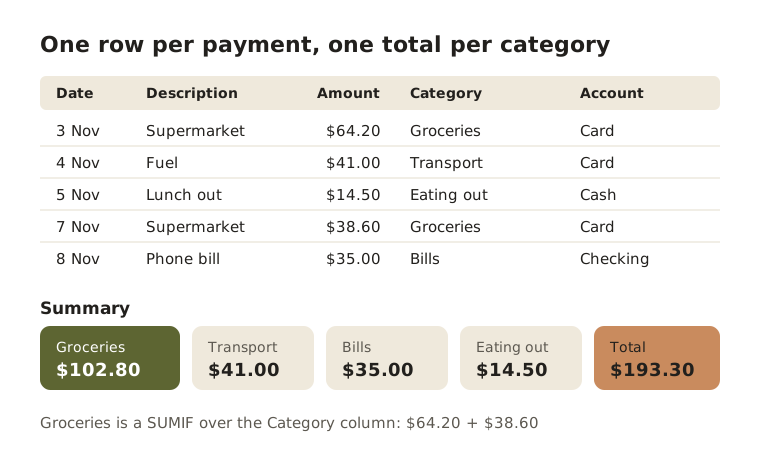
A spreadsheet is the most flexible free option. Use one row per payment and five columns: Date, Description, Amount, Category and Account. A second tab adds up each category with a formula such as =SUMIF(D:D, "Groceries", C:C), which totals column C wherever column D says Groceries.
You do not have to type every row. Most banks let you download your transactions as a CSV file, which opens in Excel, Google Sheets or Numbers. Paste the rows in, then fill in the Category column. Our guide to downloading a bank statement shows where to find it.
- Good for: people who like to see the numbers and shape the layout their own way.
- Hard part: every bank lays out its CSV differently, so each month starts with some tidying. Payments that appear on two accounts, such as a card bill paid from checking, are easy to count twice.
Method 3: In an app
Budgeting apps take most of the adding up off your hands. They differ mainly in how the payments get in:
- Typed in by you, one payment at a time, often with a quick entry screen on your phone.
- Read from the statements you download from your bank each month.
- Linked to your bank, so transactions arrive by themselves.
Most apps sort payments into categories for you and show the totals as charts. Whichever kind you choose, check the categories it picks, because a wrong one makes the totals wrong.
- Good for: anyone who wants the totals without the arithmetic, and people with several accounts or currencies.
- Hard part: you still need to look at it. An app full of unchecked payments tells you no more than a drawer full of receipts.
Which one should you pick?
- You pay mostly in cash: a notebook, or an app with a quick way to add cash payments.
- You like building things and want it free: a spreadsheet.
- You have several accounts and little time: an app.
If you are not sure, start with the one that takes least effort this week. You can always move later.
A ten-minute weekly routine
Tracking fails when it becomes a big job at the end of the month. A short weekly check keeps it small:
- Pick a fixed day, for example Sunday evening.
- Bring in the week's payments: write up any cash, paste in new rows, or open your app.
- Fix the categories on anything that landed in the wrong place.
- Look at the running totals for the month so far and note anything that surprises you.
At the end of the month, compare each category with the month before. Once you have two or three months of numbers, you have everything you need to make a monthly budget.
How Fimerse helps
With Fimerse you can type payments in yourself or hand it your statements. Typing payments in by hand is free on every plan, and a Cash Wallet is created for you so cash has its own place. You can also say a payment out loud and Fimerse fills in the amount, currency and category for you to check.
On Plus, you can upload a statement from your bank as a PDF, a photo, a CSV or a text file instead, and Fimerse reads every transaction and sorts it into a category. Anything it is unsure about waits in a review queue for you to answer rather than being guessed. Payments that look like duplicates are flagged for you to keep or remove. You can export everything as a CSV file at any time if you also want it in a spreadsheet.
Questions people ask
Do I need to track every small payment?
Yes, at least for the first month or two. Small payments are the ones people underestimate, and they often add up to more than expected. You can group them, for example one line for the week's coffees, as long as the total is right.
How long before tracking is useful?
One full month gives you a first picture. Three months shows you which costs are steady and which jump around, which is what you need to set sensible limits.
Should I track my partner's spending too?
Only what you share. Track shared costs together and leave each person's own money to them. Our guide to budgeting as a couple covers how to set that up.