
A dinner in Paris, a hotel booked on a Spanish website, a subscription billed in dollars from the UK. Each one can cost a little more than the price you saw, because your card quietly adds a foreign transaction fee. On its own each fee is small. Over a holiday, or a year of online shopping, they add up to real money. This guide explains what the fee is, where it hides on your statement, and the two habits that remove most of it.
What a foreign transaction fee is
When you pay in a currency your card does not hold, two things happen. The card network, usually Visa or Mastercard, converts the amount into your currency at its own rate for that day. Then your bank or card issuer may add a fee on top for processing a foreign purchase.
That fee is the foreign transaction fee. It is normally a percentage of each purchase. Chase says it is generally about 1 to 3 percent in the US, and some issuers charge none at all. In the UK it is often called a non-sterling transaction fee, and Wise's round-up of UK banks found common examples around 2.75 to 2.99 percent. Your own card's fee is in its fee document or terms, and that is the number that matters.
Two things catch people out:
- It is not only a travel fee. Paying a website that charges in another currency triggers it from your sofa at home.
- Cash costs more. A withdrawal abroad can carry the foreign fee, a separate cash fee, and a charge from the ATM owner, all on one transaction.
How to spot it on your statement
Fees show up in two ways, and the second is easy to miss.
1. A separate fee line
Many banks post the fee as its own line, right under the purchase. Look for wording such as "foreign transaction fee", "non-sterling transaction fee", "international service assessment" or "currency conversion fee". The amount will be a small, odd number that is a fixed percentage of the purchase above it. A card statement from any bank is worth reading line by line once a month for exactly this reason.
2. A worse exchange rate
Some cards fold the cost into the rate instead of listing a fee. Your statement shows only the converted amount, so you have to check the rate yourself. Divide the amount charged by the amount in the original currency, then compare it with the rate the card network used that day. Visa publishes an exchange rate calculator and Mastercard a currency converter for exactly this check; both let you enter your bank's fee percentage. A gap between the two is the cost you paid.
A worked example
Say you pay a 120 euro restaurant bill with a US card on a day when the network rate is 1 euro to 1.08 dollars.
- A card with no foreign fee, paid in euros: 120 x 1.08 = $129.60.
- A card with a 3 percent fee, paid in euros: $129.60 plus a $3.89 fee line = $133.49.
- Paid in dollars at the terminal: the restaurant's own rate of 1.14 gives $136.80, before anything your card adds.
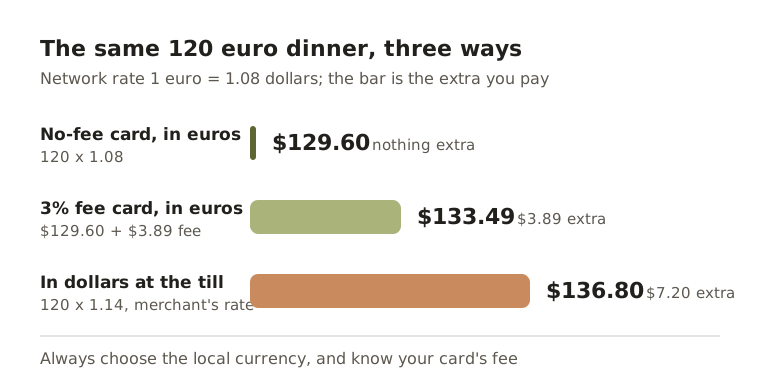
The third option is the expensive one, and it is the one the card machine offers you as a favour.
The "pay in your own currency?" trap
When a card machine, ATM or website abroad asks whether you want to pay in your home currency, it is offering dynamic currency conversion. It sounds helpful because you see a familiar number. But the exchange rate is then set by the shop, the ATM owner or their payment provider, not by your card network, and it is usually worse. Mastercard's converter page notes that when a merchant or ATM converts the transaction, Mastercard's rate no longer applies. Monzo's help pages give the same warning for ATMs: choosing pounds instead of the local currency is the usual reason for an unexpected extra fee.
The rule is short: always choose the local currency. Euros in France, pesos in Mexico, pounds in London.
How to avoid foreign transaction fees
- Check your card before you go. Open your bank's fee document and look for the foreign or non-sterling transaction fee, the cash withdrawal fee and any ATM fee. If the numbers are high, this is the moment to change cards, not the day before you fly.
- Use a card with no foreign fee. Many banks and money apps offer one. Monzo, for example, says card payments abroad are fee-free at Mastercard's rate, with a limit on fee-free cash withdrawals every 30 days. Which card suits you is a personal decision; compare the fee documents, and ask a professional if you are unsure.
- Pay in the local currency. Decline the home-currency offer every time, at tills, ATMs and online checkouts.
- Take out cash less often. Fewer, larger withdrawals mean fewer fixed fees, where that is safe to do.
- Watch online shops. If a site offers a choice of currency, compare its home-currency price with the local price plus your card's fee. The convenient option is often the dear one.
Track what the fees cost you
Fees you cannot see are fees you keep paying. Once a month, add up every fee line on your statements and the rate gaps you found. A number like "$47 in foreign fees this year" is what finally makes a card switch worth the effort. If you hold money in more than one currency, the guide on tracking money in more than one currency shows how to keep each account honest.
How Fimerse helps
Fimerse reads a statement from any bank as a PDF, photo, CSV or text and sorts every line into categories, including a Fees category, where a fee your bank posts as its own line lands. If that line also carries the payment's name or statement reference, Fimerse links the two, so you can see what the payment really cost, while the fee still counts only once. Search the ledger for "fee" or "foreign" to pull every one of them together, and the spending breakdown by category shows the Fees total over this month, the last 3, 6, 9 or 12 months, or any range you choose.
Every account keeps its own currency, and totals are shown in the currency you choose at live rates, with an optional second currency underneath. There is a currency converter in the app for a quick rate check. Reading statements is part of Plus; typing payments in by hand is free.
Questions people ask
Do debit cards charge foreign transaction fees too?
Often, yes. The fee depends on the card and the account, not on whether it is credit or debit. Check the fee document for each card you plan to use.
Can I get a foreign transaction fee refunded?
Usually not when it was charged correctly under your card's terms. If a fee does not match your terms, or a machine converted the currency without giving you a clear choice, contact your bank with the receipt and the statement line.
Is the exchange rate on my statement the "real" rate?
It is the rate your card network or bank applied that day, which may include a margin. Comparing it with the network's published rate for the same date shows whether there was one.