
When a budgeting app asks to connect your bank, it is asking for ongoing access to your financial history. That can be done well or badly, and the difference is worth understanding before you click Allow.
The two ways apps connect to banks
Logging in as you
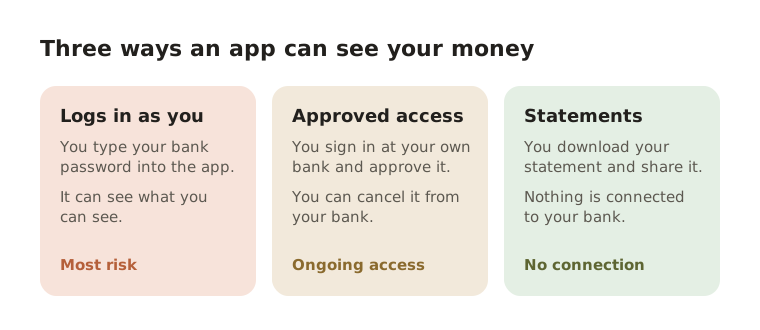
Some services ask for your online banking username and password, then log in to your bank as if they were you and read the pages. This is often called screen scraping. It works with banks that offer nothing better, but it means a third company holds credentials that can do everything you can do in your online banking.
Approved access through your bank
The better method sends you to your bank's own website or app, where you sign in as normal and approve read access for that service. The app never sees your password; it receives a token that your bank can limit and that you can cancel from your bank's settings. In the UK and the EU this is the basis of open banking, and many banks elsewhere now offer something similar.
Questions to ask before you connect
- Where do I type my password? If the answer is inside the budgeting app rather than on your bank's own page, think twice.
- What can it do? Read-only access to transactions is very different from access that can move money.
- How do I disconnect? You should be able to cancel access from your bank, not only from the app.
- What does my bank say? Some banks' terms say that sharing your login with a third party can affect your protection if something goes wrong. Your account agreement or your bank's help pages will tell you.
- What happens to the data if I leave? Look for a clear way to export your data and to delete your account.
The option most people forget: do not connect at all
Every bank already sends you a complete record of your money once a month: your statement. Tracking from statements gives you the same categories, totals and trends as a connected app. There is no login to share, nothing to reconnect when the link breaks, and no ongoing access to cancel.
The trade-off is timing. A connected app updates as you spend, while a statement shows the month once it closes. For most people deciding where their money goes, a monthly picture is the one that matters.
How Fimerse handles this
Fimerse never sees your bank password, so it has none to store or lose. You upload a statement (on Plus) or type payments in by hand (free). If you would rather have transactions arrive by themselves, Plus can also connect a bank through Plaid: you sign in on your bank's own page, Fimerse receives a read-only token instead of your password, and disconnecting in Settings deletes it. The statement file is deleted after it is read; the transactions stay in your account, which is encrypted at rest, and you can export everything as CSV or delete it all at any time. You can read how the data is handled on the security page.
Questions people ask
Is open banking safe?
Open banking was designed so that you never share your password: you approve access at your bank, and you can cancel it there. That makes it much safer than handing over a login. It still gives another company ongoing access to your transactions, so the questions above still apply.
Can a budgeting app take money from my account?
An app with read-only access cannot. An app holding your full online banking login could, in principle, do anything you can do, which is why the way it connects matters.